


What are regular expressions (RegEx) and what do they do?
Whenever regular expressions are mentioned one should think patterns. With regular expressions one can define and adress patterns in text. Think of something similar as a highly customisable filter.
Why is this useful?
It’s not about the “filter” itself but what you can do after you defined the right one for your goals and purposes. Most scenarios include separating one part of text from another. Either by extracting it or by breaking these parts into different columns (or sometimes rows).
Some datasets can arrive in a hopelessly messed up state which make it beyond impossible to work with them. But regular expressions are immensely powerful and allow you to separate data into different parts and in an automatic manner once you created a working one. With regular expressions you can tidy up even very unclean datasets. And that’s why they are thing.
Where can I access RegEx in Alteryx
So much for a high level description of RegEx’es. But where can one access them in Alteryx?
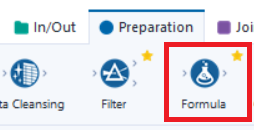
In short there are 2 tools for that: The RegEx tool in the Parse section and the Formula tool in the Preparation section.
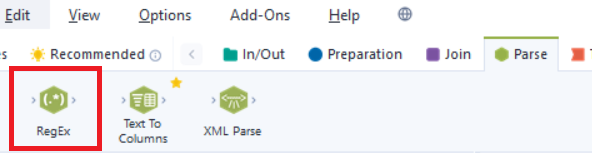
Let’s start with the first one. Here Alteryx offers 4 functionalities which I will describe in (over-)simplified terms after the following:
- Replace
- Tokenize
- Parse
- Match
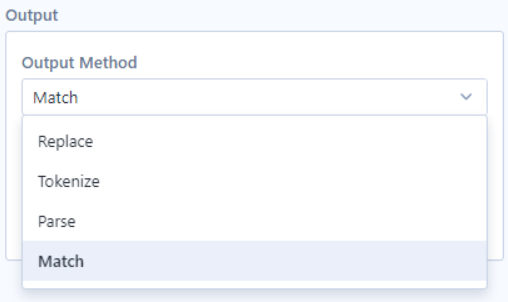
- Replace works similar to other replace functionalities so defined (a string) symbols can be replace with other ones. Only that this replace functionality allows you to define with regular expression.
- If the output which is caught by a RegEx appears at several instances in a text and each instance should be put into its column (or row) the Tokenize functionality is the right choice.
- A string can parsed, too. This means a defined output will be returned. Here Alteryx offers to flavours. Either every instance the output can be returned or only the first one.
- Match returns a boolean value and indicates that a regular expression either matches a string or not.
As mentioned before the other tool for regular expressions in Alteryx is the Formula tool and offers 3 functions:
- CountMatches, which counts how often a RegEx matches a string.
- Match is similar to Match in the RegEx tool. It tries to match a string and returns a -1 in case i does and a 0 if not.
- Replace again is similar to Replace in the RegEx tool. Generally speaking here regular expression can be definied more freely or in a less assisted way.
