


What's dbt - and why would I care?
dbt (data build tool) is an open-source transformation framework that lets you write modular SQL to transform data in your warehouse. Lightweight and file-based, it brings software engineering practices to analytics workflows. Everything about your data except the actual content lives in version-controlled and modular SQL and YAML files. Because it's all plain text, the format is natively suitable for version control (e.g. GitHub), collaboration is easy and changes are transperent. PRs, code review, branching, CI/CD, testing, all the practices that made software engineering reliable can now be applied to your data pipelines, bringing order into the chaos.
dbt data flow - raw to business-ready
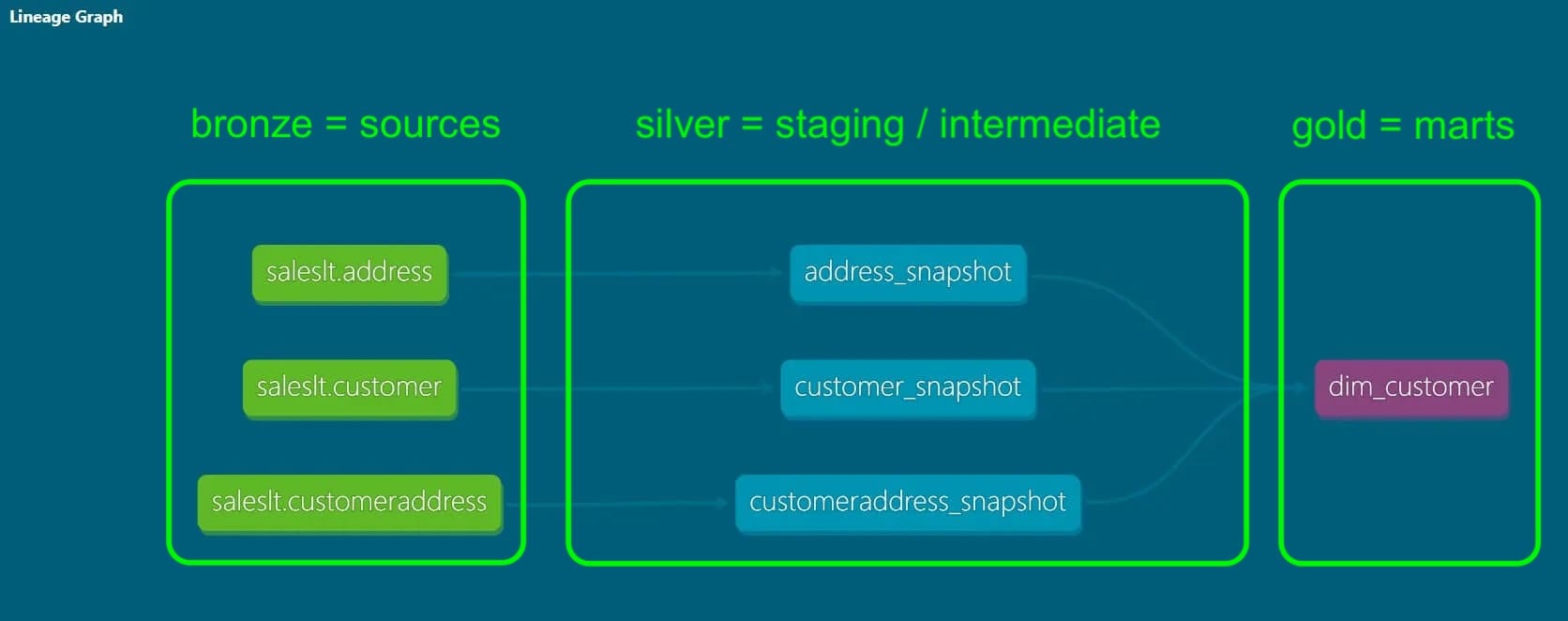
A typical data engineering concept is a three-layer pattern, indicating the degree of refinement/processing done on your data, from raw via intermediate steps to ready for business use (and typically aggregated and enriched by then). Different names for this three-part concept exist, for example the medallion architecture, which calls the layers bronze, silver and gold:
| Medallion | dbt Equivalent | What It Is |
|---|---|---|
| Bronze | Sources (_sources.yml) |
Raw tables, as-is from source |
| Silver | staging/ + intermediate/ |
Cleaned, deduplicated, typed, standardized |
| Gold | marts/ |
Analytics-ready, aggregated |
This way, the data is materialized in different places along the pipeline, facilitating maintenance and debugging, and establishing auditability. Similarly, in dbt the data flows from raw to processed, undergoing multiple transformation steps along the way. In dbt's DAG (directed acyclic graph), you can visually track how the data flows through your models, and each model's upstream dependencies. If you've worked with orchestration tools like Airflow, this concept will be familiar:
A minimalist dbt project
In a dbt project, data is being transformed while it flows through various models. If everything is file-based in dbt, which files does a dbt project need as a bare minimum to function? In general, SQL or Python files contain models (e.g. SELECT statements or pandas DataFrames). Configuration & documentation live in .yml files. Below is a minimal yet functioning setup. Note the indespensable dbt_project.yml file that contains the main configuration for the project:
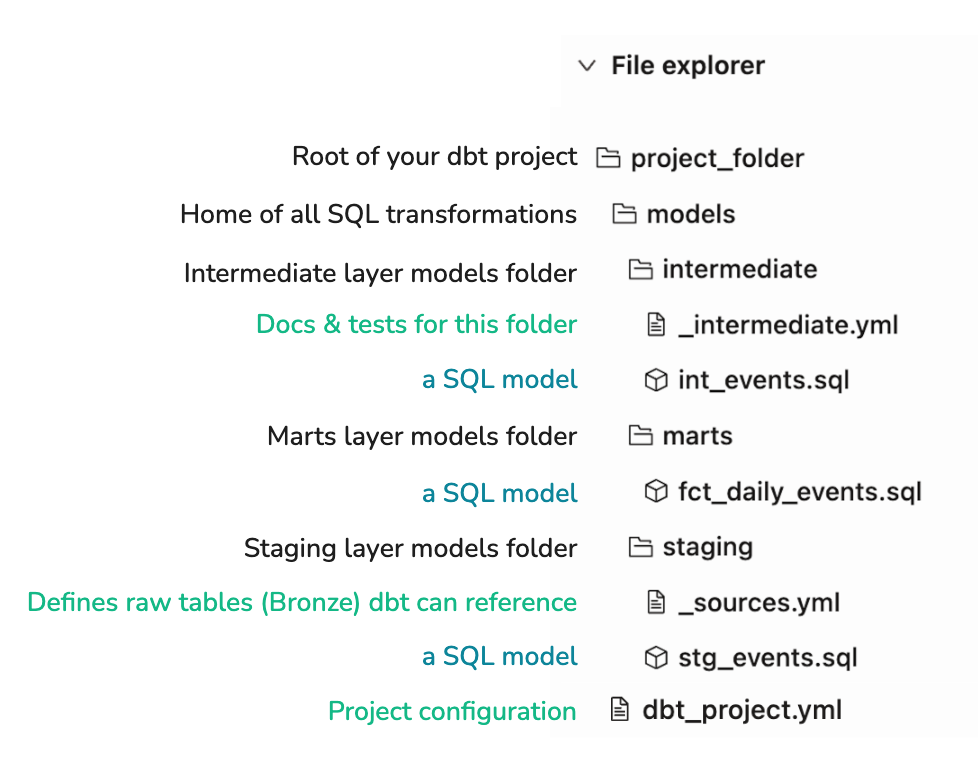
Tip: If your dbt project lives inside a larger repository (e.g. alongside ingestion scripts or orchestration code), nest it in a transform/ or dbt/ subdirectory to keep things organized.
dbt naming conventions
dbt is all about modularity. Define once & reference downstream. There are some handy conventions that help you gather some information from just the file names - and maybe keep you from getting lost in the nested repo structure:
| Prefix | Layer | Example |
|---|---|---|
stg_ |
Staging | stg_saleslt__customers.sql |
int_ |
Intermediate | int_customers_enriched.sql |
fct_ |
Marts (facts) | fct_daily_orders.sql |
dim_ |
Marts (dimensions) | dim_customers.sql |
Also: The double underscore (__) separates the source system from the entity name. This removes ambiguity: stg_google_analytics__campaigns is clearly the campaigns table from google_analytics, not analytics_campaigns from google. Files prefixed with _ (like _sources.yml) are YAML configuration files, not SQL models. They won't appear in your DAG.
A minimalist's dbt_project.yml file
What each section does:
| Key | Purpose |
|---|---|
name |
Project identifier (must match under models:) |
profile |
Links to connection settings in ~/.dbt/profiles.yml |
model-paths |
Where dbt looks for .sql models |
+materialized |
view = faster builds; table = faster queries |
Why staging = view, but marts = table?
- Staging models are building blocks, not queried directly -> views save storage
- Marts are queried by analysts/dashboards -> tables perform better
And that's it!
You now have everything you need to run dbt build and see your first DAG come to life. In the next blog, we'll cover how to add tests, documentation, and scheduling to make this setup production-ready.