


In May 2025, Microsoft Fabric introduced an innovative new feature to their software. Translytical Task Flows (TTFs). These tools allow static reports in Power BI to become tools which enable action. My cohort DS57 spent a week exploring the capabilities of these new functions on a client project with a high-street bank. We investigated how operational tasks could be embedded into Power BI reports used by relationship managers in a proof-of-concept project.
What are TTFs?
Traditional analytics within Power BI is read-only, users cannot add to, or modify dashboards when they are interacting with them. TTFs allow analysis to become both read and write. An end-user can do things such as creating tasks with annotations and editing records in a dashboard. For the case of a bank, a Customer Relationship Management (CRM) team may be interested in flagging certain customers within a dashboard. For example, ones who display strange deposit behaviour.
The following diagram demonstrates the fundamental ideas of TTFs and how user actions are processed.
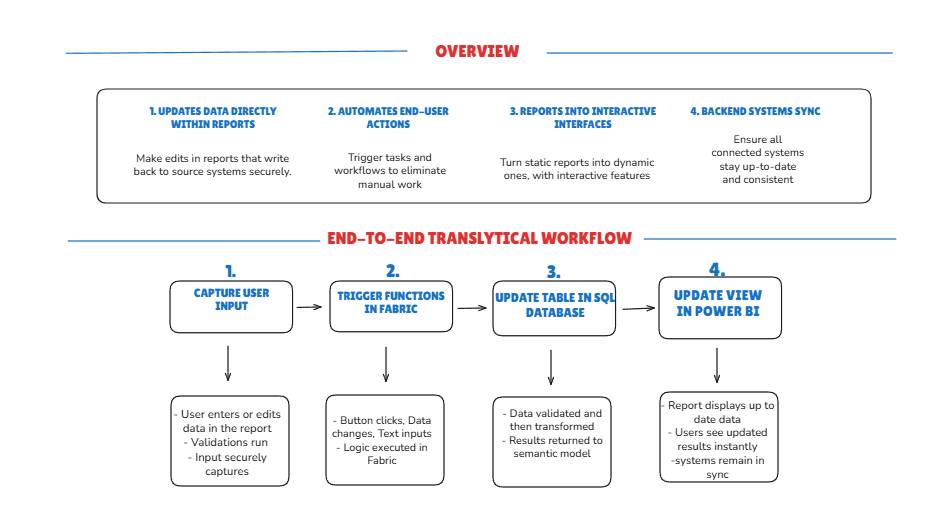
Essentially, Power BI records user activities which are then processed by Microsoft Fabric, written back to a data source and instantly reflected in the report.
Why are they interesting?
Reducing the barrier between insight and action is what makes TTFs valuable. Instead of a workflow comprising of Dashboard > Email > CRM > Database > Dashboard, the flow become: Dashboard Action > Database > Updated Report. This allows a previously laborious procedure to happen in a few clicks.
Use Cases:
There are a few broad TTF capabilities, ranging from simple database write-backs, to more advanced cases with APIs and AI. Looking at the most simple use cases, I explored two use cases for a high street bank. The diagram below outlines a use case for Data Annotation and Modifying Data Records.
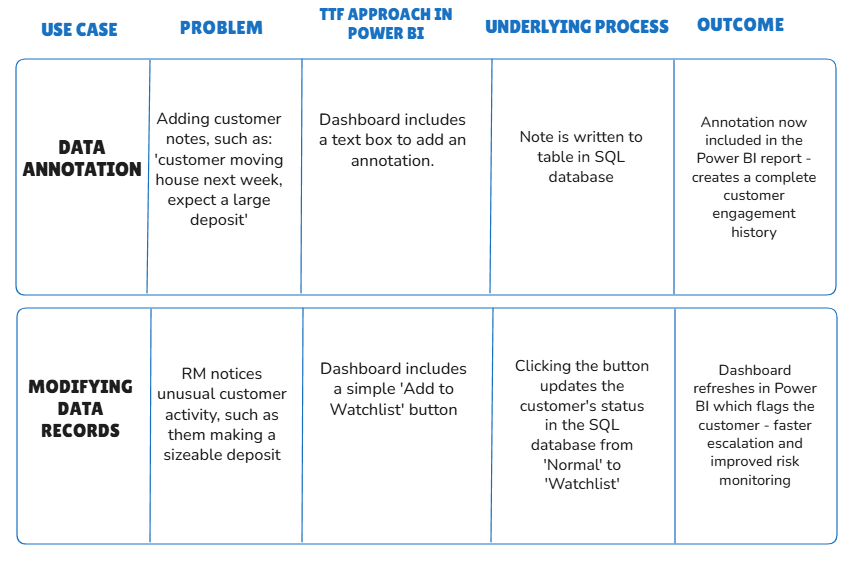
Both of these use cases are done with the most simple method of using a SQL database in Fabric. They remove unnecessary steps from operational processes.
Benefits & Limitations
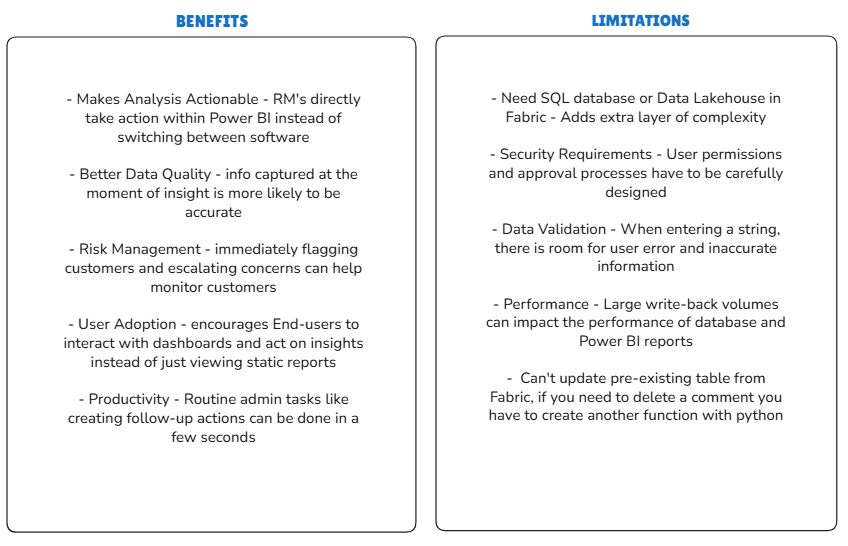
The final diagram displays some benefits and limitations of TTFs:
Conclusion:
TTF's can provide genuine value in turning static reports and labour intensive tasks into simple, quick workflows. It can reduce the gap between insight and action by allowing end-users to act directly from the a dashboard. Even the straightforward cases we have looked at can provide significant business value. They provide a very intriguing look into potential future use-cases of interactive analytics, even though there are some limitations to consider, but overall they are a very exciting new feature, and I highly recommend exploring them yourself.